
Game sprite sheets with GPT Image 2.6
People build small games from GPT Image sprite sheets: Higgsfield showed a junkyard game where 2.6 "kept consistent style across every GIF sprite sheet" (@higgsfield_ai), a first-person boxing game (post) and two anime fighters kept consistent "across every edit" (post); a full original game in 24 hours used GPT Image for four side views and level concept art (8.4k likes).
Two routes:
| PNG sheet (this skill's main route) | Native GIF (output_format: "gif") |
|
|---|---|---|
| What you get | One PNG with a 4×4 grid you control | A GIF; the sheet is hidden |
| Alpha | Full 8-bit with background: "transparent", or a white background you key out |
1-bit (on/off), 256 colours |
| Frame size | sheet ÷ 4: 256 px from 1024×1024, 512 px from 2048×2048 | ≤ 720 px for 16 frames (gpt-image-gif section 1) |
| Timing | Yours, in the engine | frame_duration_ms |
| Cost | one image (6 credits at 1024², more for 2048², estimate first) | one image |
1. The 4×4 sheet spec
@SSSS_CRYPTOMAN wrote this for GPT Image 2.5, before native GIFs: 「簡単なプロンプトでもできますが、フレームがズレる場合が多かったので精度を上げた作り方です」
("a simple prompt works too, but the frames often shifted, so this is a more precise method";
post, 473 bookmarks). Attach
the character image in files. Original (Japanese):
このキャラクターを参照して、ゲーム用の2Dアニメーションスプライトシートを作成して。
内容は「🔴アクションを記入」

1つの連続したアクションを、4列×4行の合計16フレームで表現する。

【スプライトシート仕様】
・正方形キャンバス
・4列×4行、合計16フレーム
・16個のセルは完全に同じ大きさ
・各セルの上下左右に最低10pxの余白を確保する
・枠線、グリッド線、数字、文字、記号、UIは一切不要
・背景は全フレームで統一された単色の白
・各フレームは左上から右へ、上段から下段へ、時間順に並べる

【最重要:サイズと位置の固定】
・16フレームすべてでキャラクターの表示倍率を統一する
・カメラのズームイン、ズームアウトは禁止
・足元の接地面の基準線を同じ高さに固定する
・キャラクターの中心位置がフレームの前後で大きく移動しない
・動きに必要な範囲だけポーズを変える

【最重要:セル内に完全に収める】
・髪、服、手足、武器、小物、エフェクト、残光、粒子を含むすべてを各セルの内部だけに収める
・隣のセルにはみ出さない
・余白10pxの安全領域を侵さない
・アクションが大きくなっても、キャラクターを縮小して調整しない
・必要ならエフェクトや腕の振り幅を控えめにして、セル内に収める

【描画方針】
・2Dゲーム用スプライトとして読みやすい、明快なシルエット
・フレーム間で自然につながる動き
・1枚絵ではなく、アニメーション素材として破綻のない連続性を重視
・各フレームの描き込み密度、線、塗り、陰影を統一する
English translation:
Using this character as the reference, create a 2D animation sprite sheet for a game.
Action: "[🔴 write the action here]"

Show one continuous action in 4 columns × 4 rows, 16 frames in total.

[Sprite sheet spec]
- Square canvas
- 4 columns × 4 rows, 16 frames in total
- All 16 cells exactly the same size
- At least 10 px of margin on every side of each cell
- No borders, grid lines, numbers, letters, symbols or UI at all
- One plain white background, the same in every frame
- Frames in time order: left to right, top row to bottom row

[Most important: fixed size and position]
- The same character scale in all 16 frames
- No camera zoom in or out
- The ground line under the feet fixed at the same height
- The character's centre does not move much from one frame to the next
- Change the pose only as much as the motion needs

[Most important: everything inside its cell]
- Hair, clothes, arms and legs, weapons, props, effects, afterimages and particles all stay inside their own cell
- Nothing spills into the next cell
- Nothing enters the 10 px safety margin
- Even when the action gets bigger, do not shrink the character to make it fit
- If needed, tone down effects and arm swings so they stay in the cell

[Drawing]
- A clear silhouette that reads well as a 2D game sprite
- Motion that flows naturally from frame to frame
- Not a single illustration: unbroken continuity as animation material comes first
- The same detail, line, colour and shading in every frame
His second step, in ChatGPT's Work mode: 「この画像を均等に分割してGIFを作成。各フレームの前後でキャラの立ち位置や設置面が合うように調整する。」
"Split this image evenly and make a GIF. Adjust it so the character's standing position and ground
contact match from frame to frame." That step is scripts/slice.sh … --align (section 3).
Settings on varg: aspect_ratio: "1:1" (or image_size: {"width": 2048, "height": 2048} for 512-px
cells), quality: "high", reasoning_effort: "high", output_format: "png". For a transparent sheet,
replace the white-background line with "transparent background" and set background: "transparent".
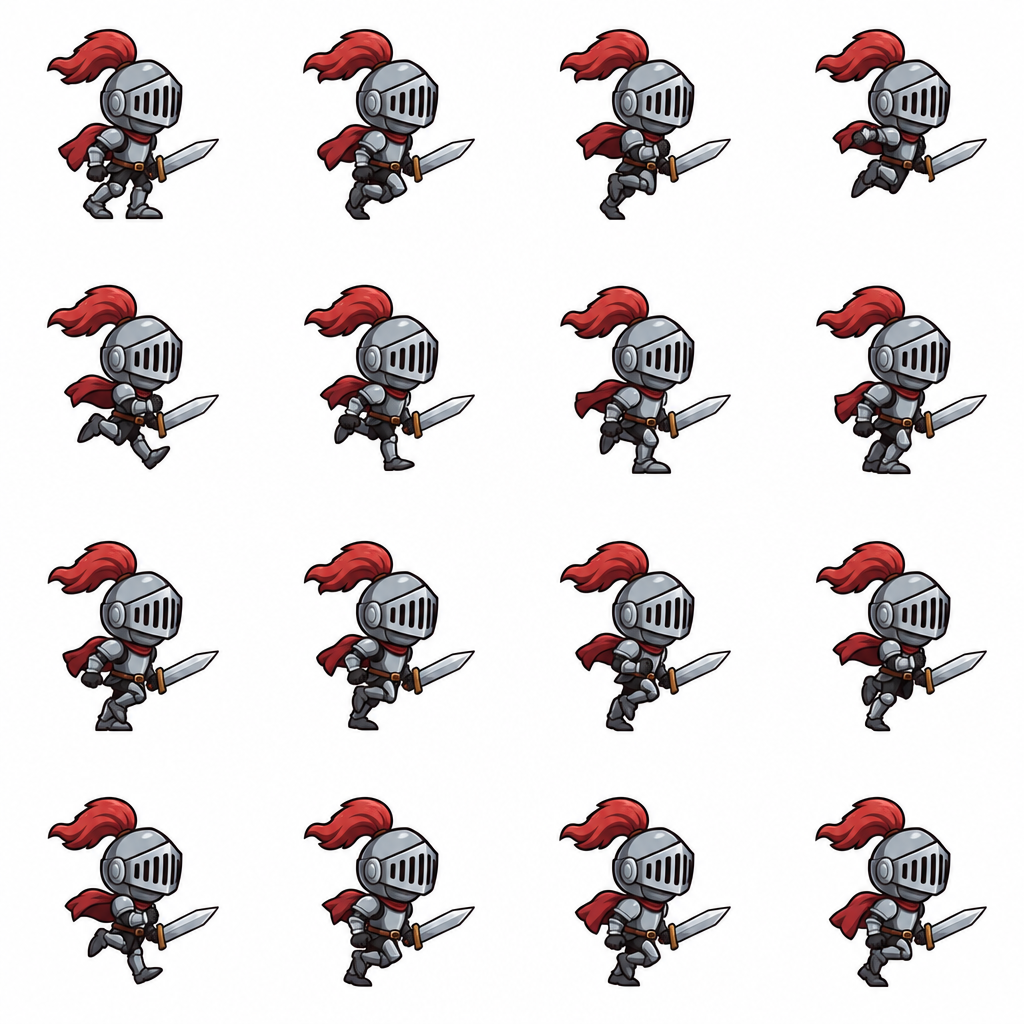
Our example: a knight run cycle, 4×4 on 1024×1024 (made on varg with gpt_image_2_6,
2026-11-04/05, from a prompt based on this spec):
https://s3.varg.ai/files/194b94d0-58ff-4e8b-91de-4f1959d04013/file_e80336e6b820.png
2. Make the sheet
call_tool({
  "tool": "image",
  "input": {
    "model": "gpt_image_2_6",
    "prompt": "<the spec above, with the action filled in>",
    "files": [{"url": "https://s3.varg.ai/files/…/character.png"}],
    "aspect_ratio": "1:1",
    "provider_options": {"fal": {"quality": "high", "reasoning_effort": "high", "output_format": "png"}}
  },
  "wait": true
})
Without a character image, drop files and describe the character in one paragraph at the top. Over
REST the same input goes to POST https://api.varg.ai/v2/image (gpt-image-2-6
section 6). Make one sheet per action (run, idle, attack); keep the character image and the spec text
identical between them.
3. Slice it: scripts/slice.sh
bash scripts/slice.sh knight_run.png 4 4                         # frames + GIF + atlas + JSON
bash scripts/slice.sh knight_run.png 4 4 --key white --align     # white -> transparent, one ground line
bash scripts/slice.sh knight_run.png 4 4 --frames 14 --fps 10    # only the first 14 cells
| Option | Does |
|---|---|
--key COLOR |
makes that background colour transparent (--fuzz 8 % tolerance by default) |
--align |
moves each frame up or down so the lowest drawn pixel sits on the median ground line |
--center |
with --align, also centres each frame on the median horizontal centre |
--fps N |
GIF speed and meta.frameRate in the JSON (default 12) |
--frames N |
the first N cells, in reading order |
--name, --out |
file prefix and output folder |
It writes frames/NAME_00.png …, NAME.gif (loops forever), NAME_atlas.png (the processed frames in
the same grid) and NAME.json.
Tested 2026-11-05 on the knight sheet: 16 frames of 256×256, GIF at 12 fps (80 ms), 1024×1024 atlas;
with --key white --align, 79% of the atlas became transparent and 11 of 16 frames moved by 1-20 px.
The 20 px move was frame 3, where the knight is in the air. Use --align for idle, walk and attack
cycles; leave it off for runs and jumps with airborne frames. Keying white can leave a light fringe
on dark backgrounds; raise --fuzz or ask for a transparent sheet.
4. Use the atlas
Phaser 3: the JSON is TexturePacker's "JSON Hash" format (a frames object keyed by frame name,
each with frame: {x, y, w, h}), which load.atlas reads:
// preload()
this.load.atlas('knight', 'knight_run_atlas.png', 'knight_run.json');
// create()
this.anims.create({
  key: 'run',
  frames: this.anims.generateFrameNames('knight', { prefix: 'knight_run_', start: 0, end: 15, zeroPad: 2 }),
  frameRate: 12,
  repeat: -1
});
this.add.sprite(400, 300, 'knight').play('run');
Godot 4: Godot does not read this JSON; it only needs the grid, which is in meta.grid. Add an
AnimatedSprite2D, create a new SpriteFrames, use "Add frames from sprite sheet" on NAME_atlas.png, set
Horizontal and Vertical to the grid (4 and 4), select all frames, set the speed (12 FPS) and turn on
loop. Or use a Sprite2D with Hframes 4, Vframes 4 and animate frame from 0 to 15.
We checked the JSON structure and the frame rectangles, but did not run either engine.
From a native GIF: lay the GIF's frames out as a strip, then slice the strip:
magick run.gif -coalesce +append +repage run_strip.png
bash scripts/slice.sh run_strip.png 9 1 --name run      # 9 frames in one row
(tested on the 6-frame LOL sticker GIF: a 4608×768 atlas with its transparency kept).
5. Failure → fix
| What you see | Fix |
|---|---|
| A limb, sword or effect crosses into the next cell | The "everything inside its cell" block; smaller swings; a bigger sheet (2048²) |
| The character grows or shrinks between frames | "The same character scale in all 16 frames", "No camera zoom" |
| The feet jump up and down | --align (not for airborne frames) |
| The style or colours change between sheets | Same character image in files, same spec text; one action per sheet |
| Still and moving parts in one sheet break (@AM09_21) | One character per sheet; props and backgrounds as separate sprites |
| Pixel art fails (@Angaisb_) | Flat cartoon frames; pixelate afterwards with nearest-neighbour scaling, or use a pixel-art tool |
| Choppy cycle, missing in-between poses | Fewer, clearer key poses (e.g. 8 frames as 4×2); the engine can hold frames longer |
| Background not quite white, keying leaves specks | Raise --fuzz, or generate with background: "transparent" |
Related skills
gpt-image-2-6 (model guide, prices, character turnaround sheets),
gpt-image-gif (native GIFs and their pixel budget),
gpt-image-markup-edit (fix one bad frame in the sheet by circling it),
varg-character-design (designing the character).