

OpenClaw Dashboard Skill
Preview
The published screenshots use deterministic ?preview=1 sample data, never local host or workspace data.
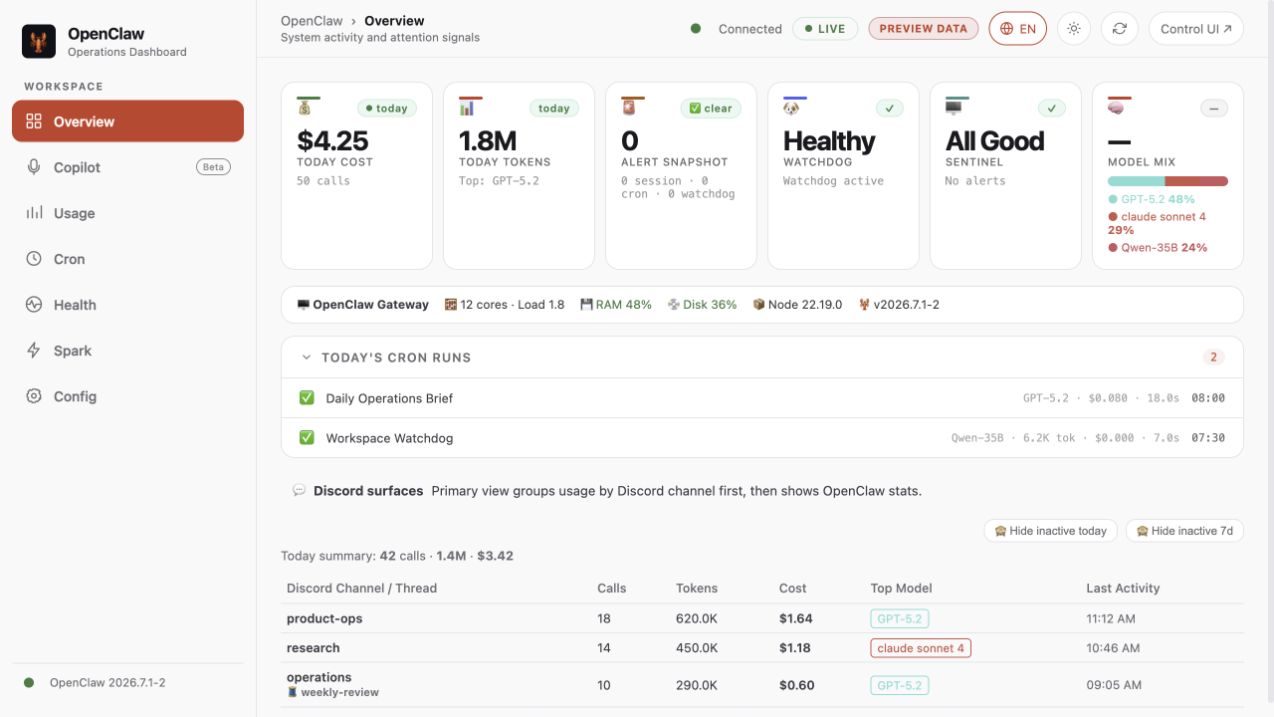
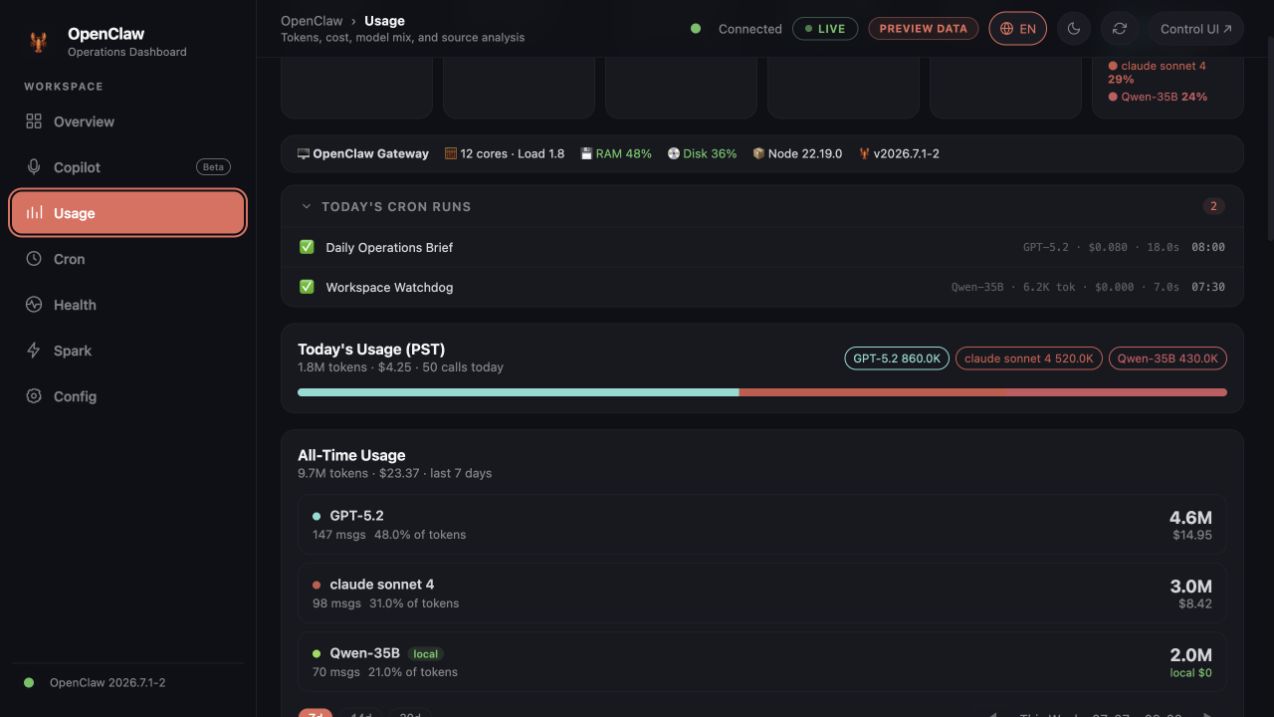
🛠️ Installation
1. Ask OpenClaw (Recommended)
Tell OpenClaw: "Install the openclaw-dashboard skill." The agent will handle the installation and configuration automatically.
2. Manual Installation (CLI)
openclaw skills install @jonathanjing/openclaw-dashboard
Mission
Keep this repository public-safe and easy to run. Prioritize:
- Secret sanitization
- Minimal setup steps
- Stable API/UI behavior
Architecture (v2.0)
The dashboard uses a modular backend + tab-based frontend architecture.
Backend entry point: backend/server.js
Business logic: backend/providers/ — one file per data domain
Frontend: frontend/tabs/ + frontend/shared/ — one JS file per tab
Runtime data: stored in ~/.openclaw/dashboard/ (outside skill dir, not Git-tracked)
Provider map
| Provider | Routes | Responsibility |
|---|---|---|
sessions.js |
/ops/sessions, /api/sessions |
Session stats + model |
ledger.js |
/ops/ledger/*, /api/cost/* |
SQLite token/cost data |
cron.js |
/ops/cron, /ops/cron-costs, /cron/today |
Cron jobs + run history + cost breakdown |
watchdog.js |
/ops/watchdog |
Watchdog state + timeline |
spark.js |
/ops/dgx-status, /api/spark/* |
DGX Spark inference node |
system.js |
/ops/system |
Host metrics (CPU/RAM/disk) |
local-api-hub.js |
/ops/local-api-hub/* |
Unified local control-plane status |
spark-tasks.js |
/api/spark/tasks/* |
DGX task history and PR Hunter output |
copilot.js |
/api/copilot/status, /api/copilot/ws |
Opt-in realtime transcript/RAG/insights |
ground-truth.js |
/api/ground-truth/*, /ops/models |
Model registry + colors |
tasks.js |
/tasks, /tasks/:id, /logs |
Read-only task/history views |
config.js |
/ops/config, /files, /skills |
Read-only config, file, and skill views |
ops-legacy.js |
/ops/channels, /ops/alltime, /ops/audit, /memory |
Read-only compatibility views |
Frontend tab map
| Tab | File | Key functions |
|---|---|---|
| Overview | tabs/overview.js |
loadSessions(), loadTasks() |
| Cost | tabs/cost.js |
loadOpsChannels(), loadOpsAlltime() |
| Cron | tabs/cron.js |
loadCronEnhanced(), loadCronCosts(), loadCronRuns() |
| Health | tabs/health.js |
renderAgentMonitor(), loadSystemInfo(), renderWatchdogStatus() |
| Spark | tabs/spark-monitor.js |
loadSparkMonitor(), task history, GPU activity |
| Copilot | tabs/copilot.js |
capability check, microphone stream, transcript/RAG/insights |
| Config | tabs/config.js |
loadConfig(), loadSkills(), loadFileList() |
| Shared | shared/api.js |
Auth, apiFetch(), watchdog renderers, toast, markdown |
| Shared | shared/ui-utils.js |
timeSince(), task state |
| Shared | shared/boot.js |
Init, week nav, chart renderers, confirm dialog |
Apply when
Use this skill for:
- Dashboard feature requests (sessions, cost, cron, watchdog, operations)
- Backend route additions/fixes in
backend/providers/ - Frontend behavior updates in
frontend/tabs/orfrontend/shared/ - README, setup, and environment simplification
- Public release checks for accidental sensitive data
Key rules for agents editing this codebase
- No duplicate function definitions across
api.jsandui-utils.js. Shared utilities belong inapi.js(loaded first).ui-utils.jsonly holdstimeSince()and task state. - Cross-tab function calls are implicit — JS shares the same
windowscope. Keep shared helpers inshared/files. - Runtime data goes to
~/.openclaw/dashboard/, not skill root. Path is set inbackend/lib/config.jsviaOPENCLAW_DASHBOARD_TASKSenv or default. /ops/modelsreturns{ registry: {...object...}, colors, displayNames, models }—registrymust be an object keyed by alias, not an array./ops/cron-costsreturns{ summary, jobs, dailyTrend, review, rows }— all five keys required for Cron tab to render correctly.hideStalequery param on/ops/sessionsfilters sessions with no activity for 7+ days.- Frontend API calls are same-origin. Never reintroduce a hardcoded dashboard/gateway port list.
- Copilot is opt-in. Require
OPENCLAW_ENABLE_COPILOT=1, an API key, authenticated WebSocket upgrade, and safe dependency failure states. - Parse request URLs against a fixed internal base. Never build a URL from the request
Hostheader. - Treat query-token login as a compatibility handoff only. Set the cookie and redirect before serving HTML; never accept query tokens on API routes.
- Parse cookies per fragment. Split on the first
=, catch percent-decoding errors, and encode cookie values when setting them. - Keep the shipped dashboard read-only. Do not add task/file mutations, restart/doctor actions, model changes, package updates, backup/restore, or legacy proxying.
- Scope Copilot Redis events by meeting ID. Permit unscoped legacy channels only for the first active meeting.
- Track the launcher and test harness. Keep
start.shandscripts/test-dashboard.jsin both Git andpackage.json#files. - Use theme tokens in canvas rendering. Never hardcode light-only chart text or borders.
OpenClaw design alignment
- Reuse the current Control UI tokens: Inter/system typography, layered neutral surfaces, thin borders, 10–14px radii, red primary accent, semantic green/yellow/red/blue.
- Keep the desktop shell as left navigation + sticky topbar; use bottom navigation on narrow screens.
- Prefer flat cards and strong information hierarchy over gradients, glow, or decorative motion.
- Support dark and light modes, visible focus states, reduced motion, and responsive layouts.
- Keep IDs and
data-tabcontracts stable when changing navigation or visual structure.
Public-safety guardrails
- Never hardcode tokens, API keys, cookies, or host-specific secrets.
- Require
OPENCLAW_AUTH_TOKEN; do not start the dashboard without authentication. - Never commit machine-specific absolute paths.
- Prefer
process.env.*and safe defaults based onHOME. - Keep examples as placeholders (
your_token_here,/path/to/...). - If uncertain, redact first and ask the user before exposing details.
- Keep sensitive behaviors opt-in (do not silently load local secret files).
Runtime access declaration
The bundled server can access local OpenClaw files for dashboard views:
- Sessions, cron runs, watchdog state under
~/.openclaw/... - Local workspace files under
OPENCLAW_WORKSPACE - Task data in
~/.openclaw/dashboard/tasks.json - Task attachments in
~/.openclaw/dashboard/attachments/
High-sensitivity features are disabled by default and require explicit env flags:
OPENCLAW_ENABLE_CONFIG_ENDPOINT=1to expose/ops/configOPENCLAW_ENABLE_COPILOT=1plusALIBABA_CLOUD_API_KEYto enable meeting Copilot
Network security:
- CORS restricted to loopback by default.
- Auth via HttpOnly cookie (
ds) orAuthorization: Bearerheader. - Set
DASHBOARD_COOKIE_SECURE=1only when the dashboard origin uses HTTPS. - Set
OPENCLAW_CONTROL_UI_URLto the complete runtime URL when Gateway TLS orgateway.controlUi.basePathis enabled. - Set
DASHBOARD_CORS_ORIGINS(comma-separated) for external origins.
Default implementation workflow
- Identify which provider or tab file owns the feature.
- Implement the smallest change that preserves behavior.
- Check: does any other tab/shared file also define the same function? If yes, deduplicate.
- Run a sensitive-string scan before finalizing.
- Run
npm test,git diff --check, andnpm pack --dry-run --json. - Ensure docs match the actual runtime defaults.
Sensitive-data checks
Before final response, scan for:
token=,OPENCLAW_AUTH_TOKEN,OPENCLAW_HOOK_TOKENAPI_KEY,SECRET,PASSWORD,COOKIE- absolute paths like
/Users/,C:\\, machine names, personal emails
If found: replace with env-based values or placeholders, and mention what was sanitized.
Files to touch most often
backend/providers/*.js— server behavior and API routesfrontend/tabs/*.js— tab-specific UI logicfrontend/shared/api.js— auth, fetch, shared renderersbackend/lib/config.js— path and env configurationREADME.md— quick start and operator docsenv.example.txt— ClawHub-compatible public-safe environment templateenv.example— compatibility mirror for Git/npm workflows