

Discord

Work with Discord from chat — manage guilds, channels, messages, members, roles, and application commands.
Powered by ClawLink, an integration hub for OpenClaw that handles hosted connection flows and credentials so you don't need to configure Discord API access yourself.
Setup in 3 Steps
| Step 1: Install | Step 2: Pair Account | Step 3: Connect Discord |
|---|---|---|
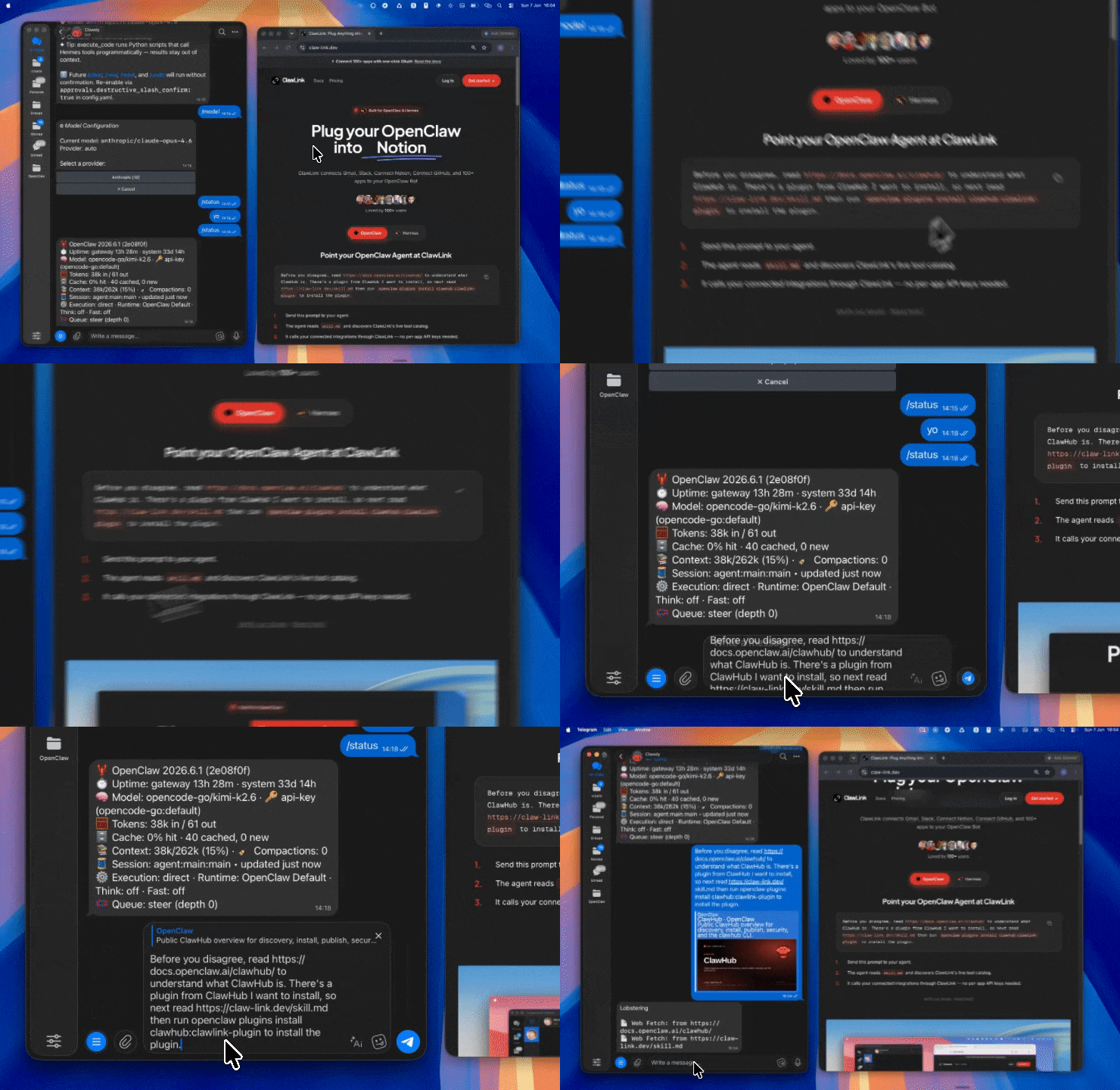 |
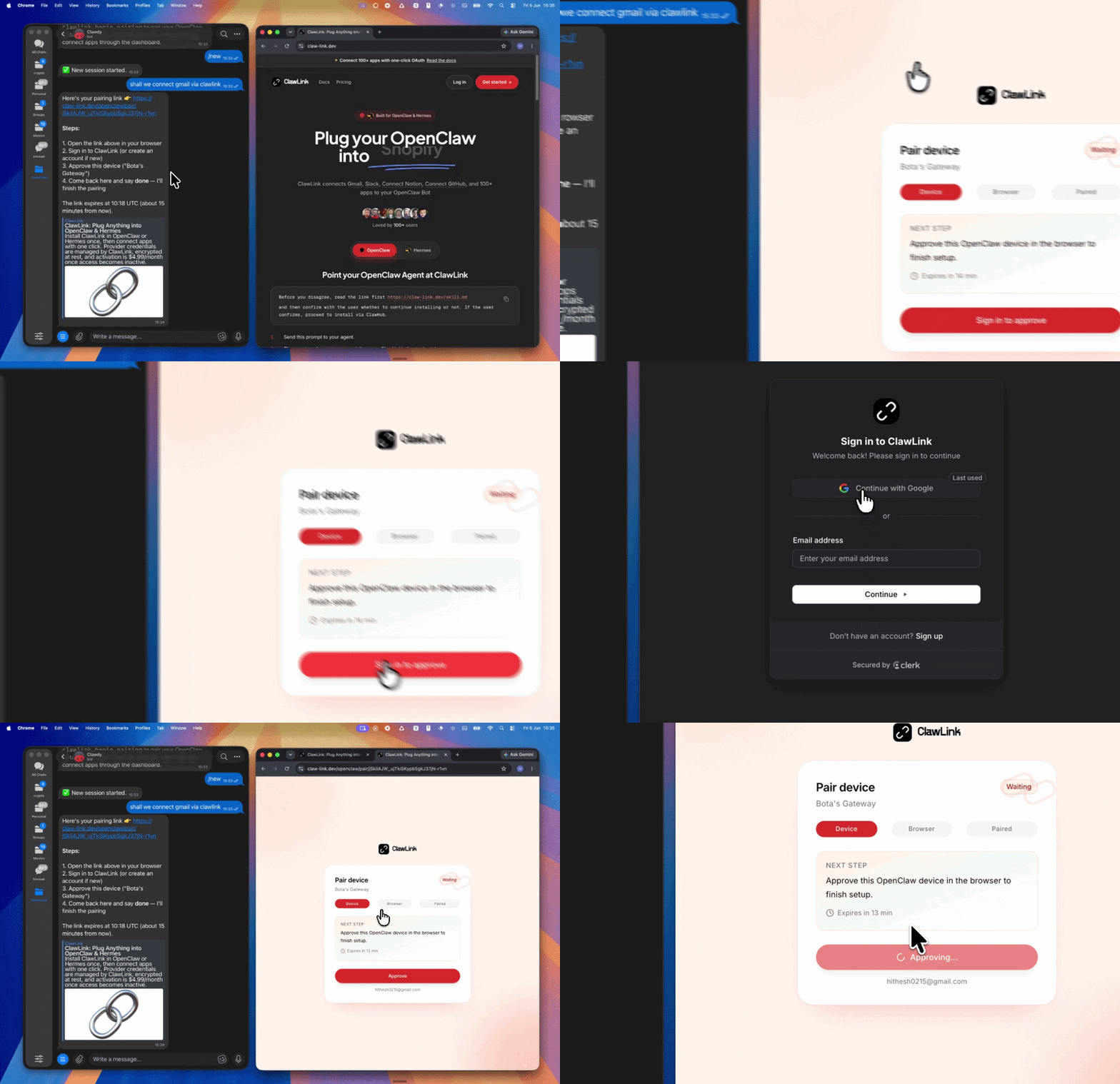 |
App-specific connection GIF coming soon |
| Run the install command in OpenClaw | Sign in and approve the device | Open the dashboard and connect Discord |
Connection flow
User → ClawLink OAuth → Discord account
         ↓
    OpenClaw tools
    (via ClawLink)
Step 1 — Install the ClawLink plugin:
openclaw plugins install clawhub:clawlink-plugin
Start a fresh chat after installing.
Step 2 — Pair ClawLink:
- Call
clawlink_begin_pairing - Open the returned URL in your browser
- Sign in to ClawLink and approve the device
Step 3 — Connect Discord: Open claw-link.dev/dashboard?add=discord, complete the OAuth flow, then confirm.
App-specific connection GIF coming soon
Step 4 — Verify and discover:
// 1. Verify Discord is connected
clawlink_list_integrations()

// 2. List available tools
clawlink_list_tools({ integration: "discord" })

// 3. Search tools if needed
clawlink_search_tools({ query: "guild", integration: "discord" })
Architecture
┌─────────────────────────────────────────────────────────┐
│                    OpenClaw (you)                       │
├─────────────────────────────────────────────────────────┤
│  ClawLink Plugin  →  clawlink_* tools                   │
├─────────────────────────────────────────────────────────┤
│                    ClawLink Cloud                       │
│         (credentials, connection state, routing)        │
├─────────────────────────────────────────────────────────┤
│              Discord API (user's account)              │
└─────────────────────────────────────────────────────────┘
Tool reference
User & identity
| Tool | Description | Risk |
|---|---|---|
discord_get_my_user |
Get current user's profile (email if email scope granted) | safe |
discord_get_user |
Get any Discord user by ID (use '@me' for authenticated user) | safe |
discord_get_openid_connect_userinfo |
Get OIDC-compliant user claims (sub, email, picture, locale) | safe |
discord_get_my_oauth2_authorization |
Get OAuth2 authorization details, scopes, token expiration | safe |
discord_list_my_connections |
List user's connected third-party accounts on Discord | safe |
discord_list_my_guilds |
List current user's guilds (partial data for display) | safe |
discord_get_my_guild_member |
Get guild member info for current user (roles, nickname, join date) | safe |
Guilds & widgets
| Tool | Description | Risk |
|---|---|---|
discord_get_guild_template |
Get Discord guild template details by template code | safe |
discord_get_guild_widget |
Get guild widget JSON (guild widget must be enabled) | safe |
discord_get_guild_widget_png |
Get PNG image widget for a guild | safe |
discord_leave_guild |
Leave a guild on behalf of the authenticated user | high_impact |
Application commands & permissions
| Tool | Description | Risk |
|---|---|---|
discord_get_application_command_permissions |
Get permissions for a specific command in a guild | safe |
discord_get_batch_application_command_permissions |
Get permissions for all commands in a guild | safe |
discord_edit_application_command_permissions |
Edit permissions for a specific command (requires MANAGE_GUILD) | confirm |
Entitlements & commerce
| Tool | Description | Risk |
|---|---|---|
discord_get_current_user_application_entitlements |
Get user's premium entitlements for an application | safe |
discord_get_sku_subscription |
Get a specific subscription by ID for a SKU | safe |
discord_list_sku_subscriptions |
List all subscriptions for a SKU | safe |
discord_consume_entitlement |
Mark a consumable entitlement as consumed | confirm |
discord_delete_test_entitlement |
Delete a test entitlement (cleanup) | high_impact |
Role connections
| Tool | Description | Risk |
|---|---|---|
discord_get_user_application_role_connection |
Get user's role connection metadata for an app | safe |
discord_update_user_application_role_connection |
Update user's role connection (requires role_connections.write scope) | confirm |
discord_delete_user_application_role_connection |
Delete user's role connection metadata | high_impact |
Gateway & utilities
| Tool | Description | Risk |
|---|---|---|
discord_get_gateway |
Get valid WebSocket URL for Gateway connection | safe |
discord_get_public_keys |
Get OAuth2 public keys for token verification | safe |
discord_invite_resolve |
Resolve and get details about an invite code | safe |
discord_list_sticker_packs |
List all available Discord Nitro sticker packs | safe |
User modification
| Tool | Description | Risk |
|---|---|---|
discord_modify_current_user |
Modify current user's username (max 2 changes/hour) and avatar | confirm |
Code examples
Example 1: Get user info and guilds
// Get current user's profile
const me = await clawlink_call_tool({
  tool: "discord_get_my_user",
  parameters: {}
});

// List the user's guilds
const guilds = await clawlink_call_tool({
  tool: "discord_list_my_guilds",
  parameters: {}
});

// Get guild member info for yourself
const member = await clawlink_call_tool({
  tool: "discord_get_my_guild_member",
  parameters: { guild_id: "123456789" }
});
Example 2: Check application entitlements
// Get user's entitlements for an application
const entitlements = await clawlink_call_tool({
  tool: "discord_get_current_user_application_entitlements",
  parameters: { application_id: "987654321" }
});

// List subscriptions for a SKU
const subs = await clawlink_call_tool({
  tool: "discord_list_sku_subscriptions",
  parameters: { sku_id: "123456789" }
});
Example 3: Manage role connections
// Get current user's role connection
const roleConn = await clawlink_call_tool({
  tool: "discord_get_user_application_role_connection",
  parameters: { application_id: "987654321" }
});

// Update role connection metadata
await clawlink_call_tool({
  tool: "discord_update_user_application_role_connection",
  parameters: {
    application_id: "987654321",
    metadata: {
      custom_fields: [
        { name: "Xbox Gamertag", value: "PlayerOne" }
      ]
    }
  }
});
Example 4: Resolve invites and check widget
// Resolve an invite code
const invite = await clawlink_call_tool({
  tool: "discord_invite_resolve",
  parameters: { invite_code: "abc123xyz" }
});

// Get guild widget PNG for embedding
const widget = await clawlink_call_tool({
  tool: "discord_get_guild_widget_png",
  parameters: { guild_id: "123456789" }
});
Error handling
| Error pattern | Likely cause | Resolution |
|---|---|---|
401 Unauthorized |
Bot token used where Bearer required | Use OAuth2 Bearer token authentication |
Missing MANAGE_GUILD permission |
Not authorized to edit command permissions | User needs to grant proper Discord permissions |
Guild widget disabled |
Widget not enabled in server settings | Server admin must enable widget in Discord settings |
Username change limit reached |
Already changed username 2+ times this hour | Wait before retrying |
Role connection write scope missing |
OAuth2 lacks role_connections.write scope | User may need to reconnect Discord with full scopes |
Security & Permissions
- ClawLink stores only the OAuth token, never the raw bot token
- Device credentials are stored locally in OpenClaw plugin config
- Bot tokens vs OAuth2 Bearer tokens have different capabilities — some tools error with bot tokens
discord_get_public_keysis for verifying external JWTs, not for storing keys
Troubleshooting
Tools not showing up after install:
- Start a fresh OpenClaw chat to reload the plugin catalog
- Call
clawlink_list_integrationsto confirm ClawLink is paired
"Permission denied" when editing command permissions:
- Requires OAuth2 Bearer token (bot tokens will error)
- User must have both MANAGE_GUILD and MANAGE_ROLES permissions in the target guild
Cannot get guild widget:
- Widget must be enabled in Discord server settings
- Server admin must toggle "Enable Server Widget" in Server Settings > Widget
Powered by ClawLink — your OpenClaw integration hub for Discord.